Home AI Automation

Less routine.
More headroom.

AI agents and automations that take work off your team’s plate. With clear processes, your existing systems and control in the right places.

EXAMPLES FROM EVERYDAY WORK

Answer customer inquiries faster.

Your inbox1 new inquiry
Customer inquiryToday, 09:41

Quote for maintenance

Hello, could you send us a quote
for the maintenance of our equipment?

Reply prepared

Of course. What type and how many
units should we plan for?

Your team reviews and approves.

The right follow-up question is ready.
Your team decides whether to send it.

Free · approx. 4 minutes · Results without contact details

01 / Concrete example workflows

What changes in
day-to-day work?

Three possible workflows, step by step. Not customer case studies and not guaranteed results – but examples of the work a system can prepare and where your team makes the call.

Example scenario 01

Handling customer inquiries

A customer sends an inquiry by email. Information is missing, and it is not yet clear who should handle it.

Today / manual

The team reads the message, gathers customer data, forwards it and drafts follow-up questions. The current status often sits in someone’s inbox.

With a tailored system

  1. 01

    Classify the request

    The AI identifies the topic and relevant details. Fixed rules determine responsibility and priority.

  2. 02

    Add context

    Matching CRM data is retrieved through an approved interface. Missing details remain visible as open points.

  3. 03

    Prepare a reply

    The system creates a draft and submits the case for review. No binding reply is sent without being checked.

Afterwards / prepared

A classified case with customer context, open questions and a draft reply. The team reviews and decides instead of gathering everything from scratch.

Your team decides

Commitments, prices, complaints and unclear assignments stay with a responsible person.

Prerequisites & limits

What it takesAccess to the shared inbox, a reachable customer data source, and clear responsibilities and reply rules.

Where it is handed overIf customer data is contradictory or the request is ambiguous, the case is flagged for manual handling.

How we check the benefitTime to a reviewed draft · correction effort · open cases

Example scenario 02

Documents without double entry

An invoice arrives as a PDF. The data needs to go into the accounting system, and the document needs a business review.

Today / manual

Someone opens the PDF, copies over the supplier, invoice number and amounts, looks up the related transaction and files the document.

With a tailored system

  1. 01

    Extract the data

    The document is recognized and the invoice data is extracted in a structured form. Illegible passages are not filled in with guesses.

  2. 02

    Check against rules

    Required fields, totals and possible duplicates are checked. An existing purchase order can also be matched.

  3. 03

    Hand over once checked

    After the defined approval, the document is created once in the target system and linked to the original.

Afterwards / prepared

A prepared record with the original document and review history. Attention goes to discrepancies instead of copying data.

Your team decides

Business approval stays with the team. Payments are not automatically part of this workflow.

Prerequisites & limits

What it takesSuitable document quality, defined review rules and an interface or agreed import into the accounting system.

Where it is handed overMissing details, mismatched totals and possible duplicates stop the automatic hand-over and land on a review list.

How we check the benefitMinutes per document · rework rate · duplicate records

Example scenario 03

Finding internal knowledge with sources

An employee wants to know which approval a quote with special terms requires.

Today / manual

She searches folders and old messages or asks colleagues. Afterwards she has to check for herself whether the rule she found still applies.

With a tailored system

  1. 01

    Search authorized sources

    The assistant searches only approved documents that the person asking is allowed to access.

  2. 02

    Back up the answer

    Relevant passages are combined into an answer with source references. Document version and currency remain verifiable.

  3. 03

    Leave uncertainty open

    If there is no reliable rule or sources contradict each other, the assistant names the gap and refers to the responsible person.

Afterwards / prepared

A traceable answer with its source – or a clear follow-up question. The approval decision stays with a person.

Your team decides

The team is responsible for the knowledge sources and decides on exceptions. An answer from the assistant does not grant approval.

Prerequisites & limits

What it takesWell-maintained documents, named content owners and access rights that can be enforced technically.

Where it is handed overOutdated or contradictory documentation has to be cleaned up first. An assistant does not make poor sources reliable.

How we check the benefitSearch time · unanswered questions · sourced and factually correct answers

02 / Fit & limits

Not every task
needs an agent.

A solid process comes first, then the technology. For rare one-off cases, unclear responsibility or inaccessible data, it often pays to sort out the process first.

01 / If–then

Workflow automation

Inputs, rules and target steps are stable and unambiguous.

Easy to test, inexpensive to run and fully traceable.

For example

Check form → create record → send confirmation

02 / Understand

AI in the workflow

Texts or documents vary, but the surrounding process stays clear.

AI handles the fuzzy step; rules keep the process on track.

For example

Understand email → extract data → draft reply

03 / Coordinate
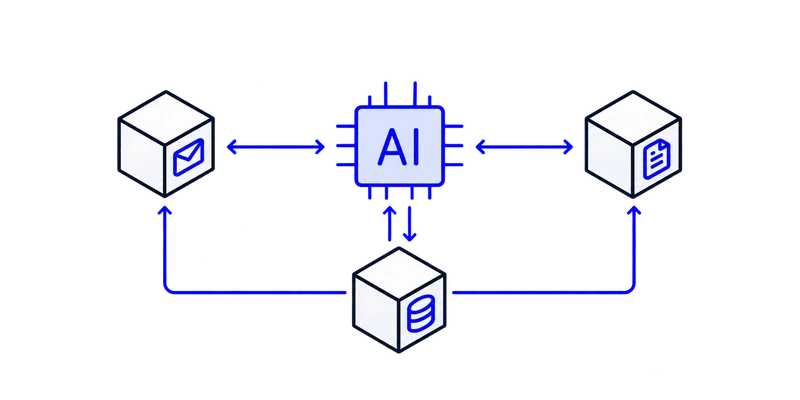
A central AI agent connects email, documents and data through a two-way exchange.

AI agent system

Several tools, interim results and follow-up questions need to be coordinated.

The system chooses the next step within defined limits.

For example

Check → complete → align → update systems

Before we automate

Four questions about your process.

If a prerequisite is missing, that is no reason for more AI – it is something we clarify first.

01Frequency

The process comes up regularly and repeatedly takes up time.

Clarify first: A rare special case often does not justify a system of its own.

02Digital input

Triggers and information are available digitally and accessible.

Clarify first: Breaks between paper and digital and unclear sources need to be sorted out first.

03Stable standard case

Most cases follow a basic pattern that can be explained.

Clarify first: Completely different cases do not yet provide a reliable basis.

04Measurable outcome

Time, throughput, errors or follow-up questions can be compared.

Clarify first: Without a target metric, the actual benefit remains invisible.

Knowledge assistant or agent?

A knowledge assistant searches and answers. An agent may also use defined tools and coordinate work steps. More autonomy is not a mark of quality – the right limits are.

03 / Integration & control

Your systems stay.
Hand-offs become clear.

Good automation needs controlled access, a clear case status and a way back to manual handling. We make these decisions before going live.

How we work together
01

Connect existing systems

First, we review the APIs, permissions and import options of your software. If there is no reliable access, the limitation is named before implementation – not hidden behind a fragile workaround.

02

Clear data and states

Which system holds the customer, the document or the case? Unique identifiers and saved processing states help avoid duplicate entries on retries.

03

Approvals in the right place

We define which data may be read and which actions may be carried out. Binding communication, sensitive changes and exceptions get clearly defined approval points.

04

Handle failures visibly

If a target system is unavailable, the case needs a visible error status, a responsible person and a controlled way to retry. Logging and retention are defined to suit the process.

04 / Your time potential

How much routine
is in your process?

Choose a specific, recurring work step. Three inputs give you a first indication. Review effort, special cases and the actual relief then have to be measured in your own business.

Your assumptions

Adjust the sliders to your process

People who regularly work on the process in question.

3

Time spent searching, transferring, coordinating or preparing.

45 min

How often the task comes up in normal operations.

5

Your potential time savings

26–35

hours per month

More time for customers, quality and the work that matters.

Check my potential

An estimate, not a promise: 60–80% relief based on 46 working weeks per year. Actual savings depend on the process.

05 / Technical questions

What remains open
before implementation.

On data, interfaces, exceptions and when a first test is really worthwhile.

Request an initial call
01What do we need to provide for a first test?

A description of the standard case, typical exceptions, some suitable sample data and an overview of the software involved. For the test, we clarify which data may be used, which access is needed and who the subject-matter contact is. Login credentials do not belong in the potential analysis.

02Does our software need an API?

An API is often the most direct route. Depending on the system, approved exports, imports or email hand-offs may also be options. If there is no stable access, we first check whether the workflow can still be implemented sensibly. Not every program can be automated reliably.

03When is a workflow without AI enough?

If inputs, rules and target steps are unambiguous, classic automation is often enough. AI covers variable tasks such as understanding an email. An agent only makes sense when several permitted tools and next steps need to be coordinated.

04What happens if the AI gives a wrong or unclear answer?

The system should not act solely on an answer that sounds plausible. We define mandatory checks, permitted actions and hand-offs to people. For documents, for example, missing fields can stop processing; for knowledge questions, missing or contradictory sources are flagged.

05How do we prevent duplicate entries on a retry?

Where the interfaces allow it, we use unique case identifiers and check the saved processing status before writing again. Transfers that have not been clearly confirmed need to be reconciled before they are retried.

06How are confidential data and permissions taken into account?

Before the test, we clarify which data and user groups are involved, which providers may receive data and which access is required. Access rights must also apply to search results and linked documents. The specific technical and contractual requirements are reviewed for each process.

07How do we check whether the automation really helps?

We set baseline values in advance, such as processing time, correction effort and error rate. Then we test with normal cases and exceptions. The calculator on this page is a guide; actual savings can only be measured in your own workflow.

08What determines costs and ongoing effort?

The key factors are available interfaces, data quality, case volume and special cases. Depending on the solution, operations add model and software costs, monitoring and adjustments to changing systems. That is why we look at setup and ongoing operations together before preparing a quote.

Next step

Nine short questions, an immediate result, no contact details required.

Which process should give you time back first?

The free potential analysis highlights concrete starting points and helps you prioritize the most sensible first step.